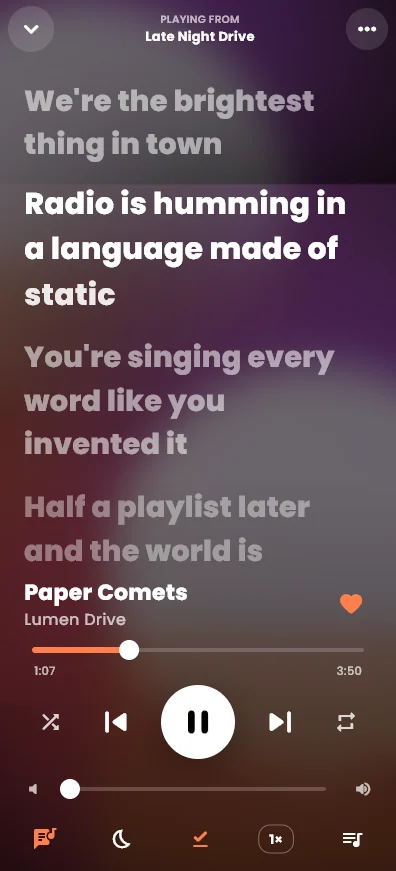
How it works
When a song starts, Meltify looks up its lyrics. For many songs it finds real per-word timing from NetEase Cloud Music, so every word lands on its exact moment. When a song only has line timing (from LRCLIB), Meltify spreads each line's time across its words by their length, so every song with synced lyrics still animates word by word.
Four lyric styles
- Karaoke fill: words brighten one by one as they're sung.
- Bounce: each word does a small hop on its beat.
- Glow: sung words light up with a soft glow in the song's colour.
- Classic lines: the whole line lights up at once, like most players.
Pick one under Settings → Lyrics. The settings page plays a live preview of each style.
Where to see the lyrics
- On a computer: the Lyrics panel on the right follows the song. For full screen, press the lyrics button or Ctrl+L.
- On a phone: open the full-screen player and tap the lyrics button at the bottom left.
- Tap any line to jump to that part of the song. Drag to read ahead; the lyrics catch up again after a few seconds.
Make them yours
- Text size from 20 to 44 pixels, and left or centre alignment.
- Depth fade dims lines further from the one being sung.
- Interlude dots show three animated dots during instrumental breaks.
- Word-by-word sync and estimate word timing can each be turned off.
- With Reduce motion on, lyrics switch to calm, still lines.
Lyrics follow playback speed. Play a song at 1.5× and the words keep up with it.
Try it on your own playlists
Meltify is free for Windows, Mac, Android and iPhone. Import a playlist and watch the words move.
Download Meltify